RAG vs Fine Tuning for Business AI: 7 Powerful Differences Every SMB Should Know

Introduction

When building AI systems for companies, one of the most common questions is whether to use RAG vs fine tuning for business AI.

Both approaches allow businesses to customize LLMs, but they solve very different problems. Many SMBs try fine tuning when they actually need retrieval, while others build RAG systems when model training would work better.

Understanding the difference between RAG vs fine tuning for business AI is important when building internal AI tools, knowledge assistants, automation systems, and document search platforms.

RAG vs fine tuning for business AI is one of the most common decisions when building internal AI systems, knowledge assistants, or automation platforms for SMBs.

This guide explains architecture, differences, use cases, and best practices used in real production AI systems.


What is RAG in Business AI

RAG stands for Retrieval-Augmented Generation.

A RAG system retrieves company data at runtime and sends it to the LLM before generating a response.

Flow:

User → Query → Retriever → Vector DB → Context → LLM → Response

RAG is commonly used for:

  • company knowledge base
  • internal chatbot
  • document search
  • support AI
  • workflow automation

RAG works best when company data changes often.


What is Fine Tuning in Business AI

Fine tuning means training a model on custom data so the model learns behavior, style, or domain knowledge.

Instead of retrieving documents, the model itself is modified.

Fine tuning is used for:

  • classification
  • structured output
  • tone control
  • domain language
  • scoring models

Companies building internal AI systems often need:

  • access to company documents
  • knowledge search
  • automation logic
  • consistent output
  • custom behavior

This leads to the decision:

RAG vs fine tuning for business AI.

Choosing the wrong architecture can cause:

  • bad answers
  • high cost
  • slow performance
  • hard maintenance

Correct architecture is critical for long-term AI systems.


When to Use RAG

Use RAG when:

  • data changes often
  • documents are large
  • knowledge stored in files
  • multiple data sources exist
  • real-time search needed

Common SMB use cases:

  • internal GPT
  • company knowledge base
  • support assistant
  • SOP search
  • HR bot
  • document lookup
  • proposal generator

RAG is best for knowledge systems.


When to Use Fine Tuning

Use fine tuning when:

  • behavior must change
  • output must follow format
  • domain language needed
  • classification required
  • consistent answers needed

Examples:

  • email classifier
  • intent detection
  • scoring model
  • structured JSON output
  • custom chatbot style

Fine tuning is best for behavior.


RAG vs Fine Tuning Architecture Comparison

RAG architecture:

Documents → Embedding → Vector DB
Query → Retriever → Context → LLM

RAG Diagram

Fine tuning architecture:

Dataset → Training → Model update → Inference

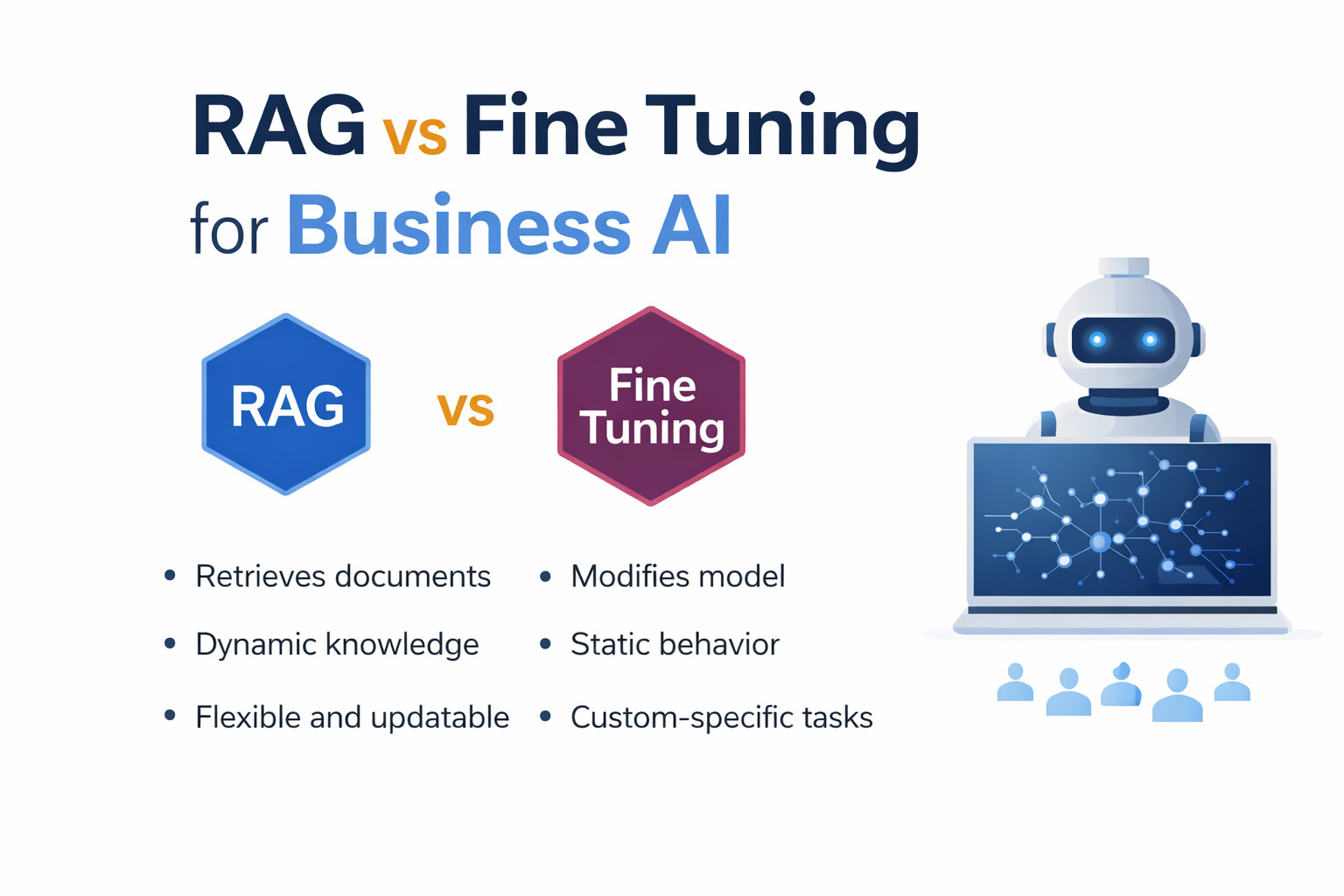
Key difference:

  • RAG retrieves data
  • Fine tuning changes model

Diagram description:

RAG
User → API → Retriever → Vector DB → LLM

Fine tuning
Dataset → Training → Model → API


Data Flow Comparison

RAG flow:

Query
→ Search
→ Context
→ LLM
→ Answer

Fine tuning flow:

Query
→ Model
→ Answer

RAG is dynamic.
Fine tuning is static.


Hybrid Architecture: Using RAG and Fine Tuning Together

Most real AI systems use both.

Hybrid flow:

User → Agent → Retriever → Vector DB → Context → LLM → Fine-tuned model → Response

Why hybrid works:

  • RAG provides knowledge
  • Fine tuning provides behavior
  • Agents provide automation

Example:

Support AI
RAG → docs
Fine tuning → format
Agent → actions

Hybrid systems are common in production.


Using RAG with AI Agents

Modern AI systems use:

Agents + RAG + Fine tuning

Agents → automation
RAG → knowledge
Fine tuning → behavior

Example:

User → Agent → Tool → RAG → LLM → Tool → Response

Used in:

  • workflow automation
  • CRM AI
  • support AI
  • dashboards
  • SaaS tools

For SMB AI, this architecture is recommended.


Choosing the Right Vector Database

Popular vector DB:

  • Pinecone
  • Qdrant
  • Weaviate
  • Milvus
  • PGVector

Pinecone — managed
Qdrant — fast
Weaviate — hybrid search
PGVector — simple


Prompt Engineering in RAG vs Fine Tuning

RAG prompt:

Context + Question + Instructions

Fine tuning prompt:

Question → Model

Bad prompts cause hallucinations.

Best practice:

  • limit context
  • include metadata
  • give rules
  • avoid long prompts

Prompt design affects accuracy.


Performance Comparison

RAG depends on:

  • retriever
  • embeddings
  • vector DB
  • prompt

Fine tuning depends on:

  • dataset
  • training
  • model

RAG easier to update.
Fine tuning faster inference.


Latency Comparison

RAG latency:

retrieval + LLM

Fine tuning latency:

LLM only

Reduce RAG latency with:

  • caching
  • smaller chunks
  • fast DB

Maintenance Differences

RAG:

update docs
re-embed
re-index

Fine tuning:

retrain
test
deploy

RAG easier for changing data.


Deployment Strategies

Cloud RAG
Hybrid RAG
Local RAG
Fine tuning server

SMB → cloud
Enterprise → hybrid


Monitoring and Logging

Track:

  • queries
  • context
  • errors
  • latency
  • usage

Production AI needs monitoring.


Real Production Architecture

User → UI
UI → API
API → Agent
Agent → Retriever
Retriever → Vector DB
Vector DB → LLM
LLM → Tool
Tool → Response

Used in real systems.


Why Most SMB AI Systems Start with RAG

Most companies have documents, not datasets.

Typical order:

1 RAG
2 Agents
3 Fine tuning
4 Automation

RAG is usually first step.


Why Avinya Labs

Avinya Labs builds:

Serving globally including Dubai, Singapore, Hong Kong.


FAQ

What is the difference between RAG vs fine tuning for business AI

The main difference between RAG vs fine tuning for business AI is how the model gets information.

RAG (Retrieval-Augmented Generation) retrieves company documents at runtime and sends them to the LLM before generating an answer. This makes RAG ideal for knowledge bases, document search, and internal AI tools.

Fine tuning modifies the model itself by training it on custom data. This makes fine tuning better for behavior changes, classification, or structured output.

Most business AI systems use RAG for knowledge and fine tuning for behavior.


When should a company use RAG instead of fine tuning

A company should use RAG when:

  • documents change frequently
  • knowledge stored in files or databases
  • multiple data sources exist
  • real-time search is required
  • internal knowledge must stay private

RAG is commonly used for company knowledge base systems, internal chatbots, support assistants, and document search tools.

For most SMB AI systems, RAG is the correct starting architecture.


When is fine tuning better than RAG

Fine tuning is better when the model needs to learn behavior instead of retrieving knowledge.

Use fine tuning when:

  • output format must be consistent
  • classification is required
  • domain language is needed
  • responses must follow rules
  • the same patterns repeat often

Fine tuning works well for scoring models, intent detection, structured responses, and domain-specific AI.

Fine tuning does not replace RAG for knowledge systems.


Can RAG and fine tuning be used together

Yes, modern AI systems often combine both.

Typical architecture:

User → Agent → RAG → LLM → Fine tuned layer → Response

In this design:

  • RAG provides knowledge
  • Fine tuning controls output
  • Agents handle automation

This hybrid approach is common in production AI systems used by SMBs and enterprises.


Is RAG required for internal AI systems

In most cases, yes.

Internal AI systems usually need to access:

  • documents
  • SOPs
  • emails
  • databases
  • CRM data
  • support content

Since this data changes often, RAG is the best architecture.

Without RAG, the model cannot access updated information.


Do AI agents use RAG or fine tuning

Most AI agents use RAG.

Agents need access to company knowledge to complete tasks.
RAG allows agents to retrieve the correct information before calling tools.

Typical agent architecture:

Agent → Retriever → Vector DB → LLM → Tool → Result

Fine tuning may be added for behavior, but RAG is usually required for knowledge.


Is RAG more scalable than fine tuning

RAG is easier to scale when data changes often.

With RAG, you only need to update the vector database.
With fine tuning, you must retrain the model.

RAG scaling involves:

  • better retrievers
  • faster vector databases
  • caching
  • index optimization

Fine tuning scaling involves:

  • retraining
  • evaluation
  • redeployment

For most business systems, RAG is easier to maintain.


Can SMBs build RAG systems without training models

Yes.

One advantage of RAG is that it does not require model training.

You can build a RAG system using:

  • embeddings
  • vector database
  • LLM API
  • retriever logic

This makes RAG ideal for SMBs that want to use AI without managing training pipelines.


Is RAG secure for company data

Yes, if implemented correctly.

A secure RAG system should include:

  • authentication
  • document permissions
  • encrypted storage
  • API security
  • logging

The LLM should only receive the retrieved context, not the full database.

Security design is important for internal AI tools.


Should I use RAG, fine tuning, or both

Most production AI systems use all three:

  • RAG for knowledge
  • Fine tuning for behavior
  • Agents for automation

Recommended order for SMB AI:

  1. Start with RAG
  2. Add agents
  3. Add fine tuning if needed

This approach keeps the system flexible and scalable.


Does RAG improve AI accuracy for business use

Yes.

RAG improves accuracy because the model receives real company data before answering.

Without RAG, the model relies only on training data, which may be outdated.

RAG is the main reason modern business AI systems can work with private data.


Can RAG work with local LLMs

Yes.

RAG can work with:

  • OpenAI
  • Claude
  • local LLM
  • on-prem models

The architecture stays the same.

Only the LLM changes.

This makes RAG useful for companies with privacy requirements.


What is the best architecture for business AI today

The most common architecture today is:

Agent + RAG + LLM + Tools

This allows:

  • knowledge access
  • automation
  • structured output
  • workflow execution

This architecture is used in modern AI platforms, SaaS tools, and internal automation systems.


RAG System for Company Knowledge Base: 7 Powerful Architecture Tips for SMB AI Systems

Introduction

A RAG system for company knowledge base allows businesses to use AI with internal documents, SOPs, emails, and databases without training a custom model.
Instead of storing knowledge inside the model, a RAG architecture retrieves relevant information at runtime and sends it to the LLM.

This approach is becoming the standard for SMBs building internal AI tools, knowledge assistants, and workflow automation systems.

A RAG system for company knowledge base helps SMBs build internal AI using their own documents, databases, and workflows.

In this guide, we explain the architecture, components, implementation, and best practices for building a RAG system for business knowledge.


What is a RAG System for Company Knowledge Base

RAG stands for Retrieval-Augmented Generation.

A RAG system for company knowledge base works by:

  1. Storing company data in a searchable format
  2. Retrieving relevant content when a question is asked
  3. Sending the retrieved context to an LLM
  4. Generating an accurate answer

Basic flow:

User → Query → Retriever → Vector DB → Context → LLM → Response

This allows companies to build internal AI without training models.


Why a RAG Knowledge System Matters for SMBs

Most SMBs store knowledge across:

  • Google Drive
  • Notion
  • Slack
  • Emails
  • PDFs
  • CRM
  • Project tools

Problems:

  • information hard to find
  • repeated questions
  • slow onboarding
  • manual search
  • support dependency

A RAG system solves this by creating a single AI interface for company knowledge.

Common SMB use cases:

  • internal chatbot
  • SOP search
  • sales knowledge assistant
  • support documentation AI
  • HR policy search
  • proposal generator
  • document lookup

When to Use and When Not to Use RAG

Use RAG when:

  • data changes often
  • documents are large
  • knowledge is external
  • you need search + AI

Do NOT use RAG when:

  • you need model training
  • data is very small
  • behavior learning required
  • no document base exists

Alternatives:

  • fine tuning
  • rule engines
  • agents
  • search systems

RAG System Architecture Overview

A production RAG system for company knowledge base contains multiple layers.

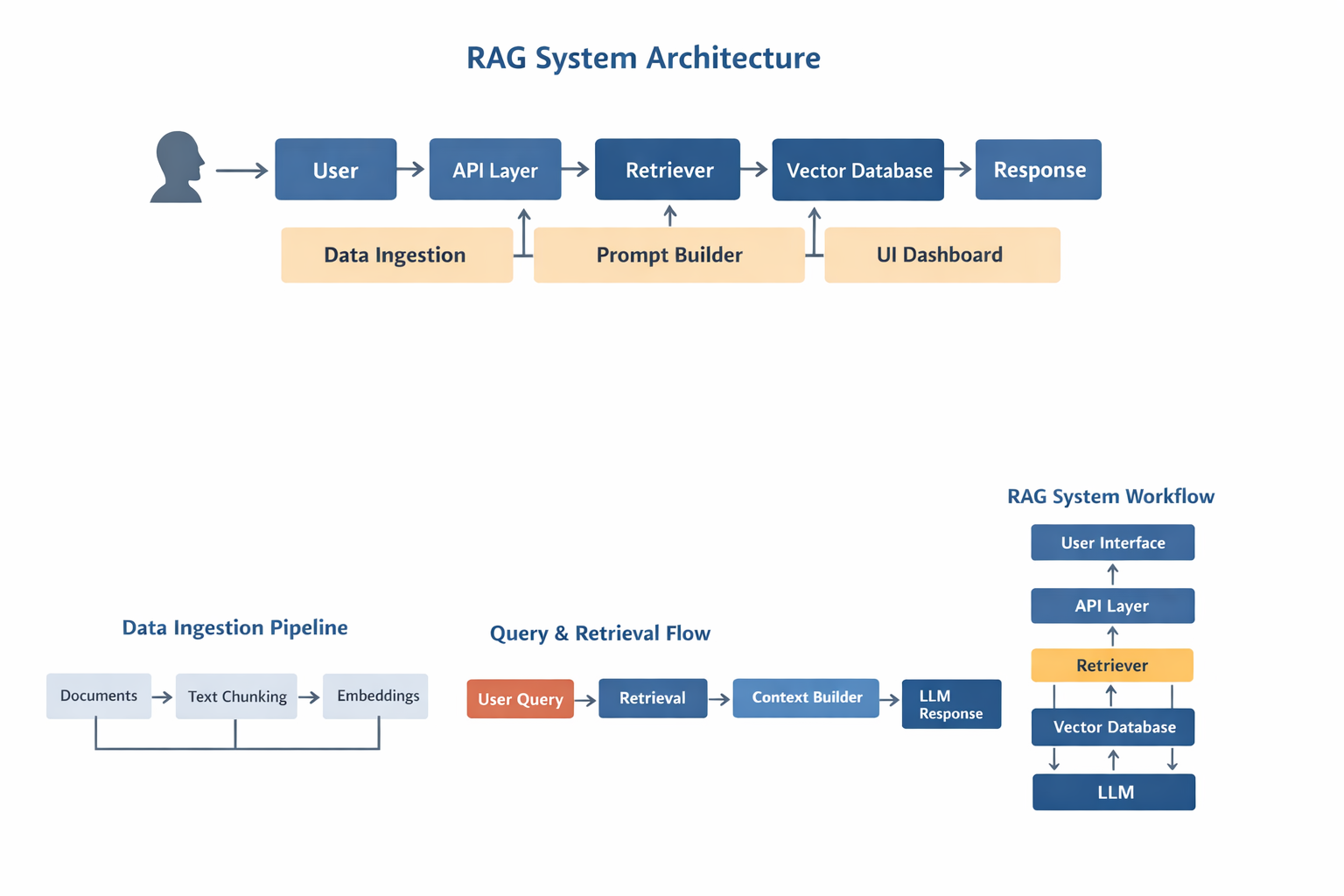
Architecture diagram:

User
→ API Layer
→ Query Processor
→ Retriever
→ Vector Database
→ Context Builder
→ LLM
→ Response Formatter
→ UI Dashboard

Core modules:

  • ingestion pipeline
  • embedding model
  • vector database
  • retriever
  • prompt builder
  • LLM
  • backend API
  • frontend UI

A production RAG system for company knowledge base requires a proper retrieval pipeline, vector database, and LLM integration.

Correct architecture is critical for accuracy.


Architecture Diagram Description

Diagram:

Documents → Chunking → Embeddings → Vector DB
User → API → Retriever → Vector DB → Context → LLM → Response
Admin → Upload → Index → Search

RAG system diagram

This diagram represents a typical RAG system used in production.


Components of a RAG System

Document Loader

Loads data from:

  • PDF
  • DOC
  • DB
  • API
  • Notion
  • Drive
  • Slack

Converts to text.


Text Chunking

Documents split into smaller parts.

Rules:

  • 500–1000 tokens
  • overlap enabled
  • semantic boundaries

Bad chunking reduces accuracy.


Embeddings

Text → vector representation.

Common models:

  • OpenAI embeddings
  • BGE
  • E5
  • Instructor

Embeddings enable semantic search.


Vector Database

Stores embeddings.

Popular options:

  • Pinecone
  • Qdrant
  • Weaviate
  • Milvus
  • PGVector

Vector DB allows similarity search.


Retriever

Finds relevant chunks.

Methods:

  • similarity search
  • hybrid search
  • reranking

Retriever quality affects output quality.


Prompt Builder

Combines:

  • user query
  • context
  • instructions

Prompt = Context + Question + Rules

Prompt design is important.


LLM Layer

Model options:

  • GPT
  • Claude
  • open-source LLM
  • local LLM

LLM generates final answer.


API Layer

Handles:

  • auth
  • requests
  • logging
  • caching
  • rate limits

Common backend:

  • Node
  • Python
  • FastAPI

UI Dashboard

Provides:

  • chat interface
  • search UI
  • admin panel
  • document upload
  • analytics

Frontend stack:

  • React
  • Next.js
  • Tailwind

Data Flow in a RAG System

Flow:

Documents
→ Loader
→ Chunking
→ Embedding
→ Vector DB

Query
→ Retriever
→ Context
→ LLM
→ Answer

Clear flow improves performance.


Step-by-Step Implementation

  1. Define data sources
  2. Build ingestion pipeline
  3. Create embeddings
  4. Store in vector DB
  5. Implement retriever
  6. Connect LLM
  7. Build API
  8. Build UI
  9. Add auth
  10. Add logging

Production systems require all layers.


Tech Stack Options

Typical stack:

Alternative stack:

  • local LLM
  • Milvus
  • FastAPI
  • Redis

Stack depends on scale.


SMB vs Enterprise RAG Design

SMB:

  • single index
  • simple retriever
  • small docs
  • basic UI

Enterprise:

  • multi index
  • permissions
  • caching
  • reranking
  • orchestration
  • audit logs

Design must match usage.


Real Use Cases

  • internal GPT
  • AI support agent
  • AI sales assistant
  • document AI
  • HR bot
  • ops automation
  • knowledge search

Most business AI starts with RAG.


RAG vs Fine Tuning vs Agents

RAG

  • best for knowledge

Fine tuning

  • best for behavior

Agents

  • best for automation

Many systems combine all.


Best Practices

  • clean data
  • good chunking
  • metadata tagging
  • hybrid search
  • caching
  • monitoring
  • access control

Best practices improve accuracy.


Common Mistakes

  • bad chunk size
  • wrong embeddings
  • too much context
  • weak retriever
  • no security
  • no logging

Most failures come from architecture.


Scaling RAG Systems

Scaling requires:

  • caching
  • async retrieval
  • multi index
  • rerank models
  • batching
  • sharding

Large systems need optimization.


Security Considerations

Important for SMB:

  • auth
  • permissions
  • encryption
  • logging
  • access control

Never expose internal data.


Future of RAG Systems

Trends:

  • multi-agent RAG
  • memory systems
  • hybrid search
  • local + cloud LLM
  • tool calling

RAG will remain core architecture.


Why Avinya Labs

Avinya Labs builds production AI systems including:

Serving clients globally including Dubai, Singapore, and Hong Kong.


FAQ

What is a RAG system for company knowledge base

A RAG system for company knowledge base allows an AI model to retrieve internal documents, SOPs, and business data before generating answers.

Why use RAG instead of fine tuning

RAG works better for company knowledge because documents change frequently and do not require model retraining.

Can SMBs build a RAG system

Yes, SMBs commonly use RAG systems to create internal chatbots, knowledge search tools, and automation assistants.

What database is used in RAG

Vector databases like Pinecone, Qdrant, Weaviate, or PGVector are commonly used in a RAG system for company knowledge base.

Is RAG secure for internal data

Yes, when authentication, permissions, and API security are implemented, RAG systems can safely use private company data.

Can RAG be used with AI agents

Yes, many modern AI agent systems use RAG to access company knowledge during automation workflows.

How does a RAG system scale

Scaling requires caching, multiple indexes, better retrievers, and optimized embeddings.

Do all AI systems need RAG

No, but most business AI applications that use documents or knowledge bases benefit from RAG architecture.


A well-designed RAG system for company knowledge base can become the core of internal AI automation.

Operational AI Systems: The Ultimate 2026 Guide to Smarter, Scalable Enterprise Infrastructure

Operational AI systems are becoming the new competitive baseline for enterprises in 2026. The question is no longer whether companies adopt AI. The real question is how deeply AI is embedded into core operations.

Across industries, AI has moved beyond experimentation. It is no longer a chatbot, a dashboard feature, or a pilot initiative. It is becoming infrastructure.

Companies that treat AI as a surface-level feature will see incremental gains. Organizations that implement operational AI systems into decision flows, compliance pipelines, revenue engines, and infrastructure layers will unlock exponential leverage.

Waiting is no longer neutral. It is a strategic disadvantage.

Why Operational AI Systems Are the New Competitive Baseline

Operational AI systems differ from traditional automation tools. They do not simply respond to prompts. They reason, act, adapt, and execute across workflows.

Instead of isolated task automation, operational AI systems orchestrate entire processes across:

• Legal operations
• Compliance and governance
• Procurement
• Sales and revenue
• Finance
• Web3 infrastructure
• Enterprise operations

Industry research shows that agentic AI and multi-agent orchestration are reshaping enterprise architecture. AI systems are now capable of executing end-to-end workflows with minimal human intervention.

Operational AI systems are becoming the operating fabric of modern enterprises.


What Makes Operational AI Systems Different from Traditional Automation

Legacy automation focused on rule-based RPA and static workflows. It required heavy manual oversight and constant maintenance.

Operational AI systems introduce:

• Context-aware decision-making
• Real-time data processing
• Adaptive learning models
• Cross-platform orchestration
• Autonomous exception routing

Instead of automating a step, operational AI systems automate judgment within defined guardrails.

This is the difference between task automation and operational intelligence.


Operational AI Systems in Action Across Enterprise Functions

Intelligent Legal Operations

Operational AI systems analyze contracts, extract clauses, detect compliance risks, and automatically route exceptions. Legal teams reduce turnaround time while maintaining regulatory precision.

Continuous Compliance and Governance

AI-powered compliance monitoring shifts from periodic audits to real-time governance. Operational AI systems monitor documentation, detect anomalies, score risk dynamically, and trigger escalation workflows automatically.

Autonomous Procurement Intelligence

Procurement teams leverage operational AI systems to compare supplier quotes, detect pricing anomalies, assess vendor risk, and forecast performance trends.

AI-Enabled Revenue Engines

Modern revenue operations use operational AI systems for:

• Intent-based lead scoring
• Personalized outreach sequencing
• Meeting booking automation
• Pipeline analytics
• Conversion optimization

Sales teams focus on closing while AI handles research and qualification layers.

Enterprise Hyperautomation

Operational AI systems orchestrate ERP, CRM, finance, and cloud platforms simultaneously. They distribute workloads intelligently, automate approvals, and reduce decision latency across departments.

Web3 and Crypto Infrastructure Monitoring

In digital asset environments, operational AI systems monitor on-chain activity, detect smart contract anomalies, trigger treasury alerts, and manage transaction risk scoring in real time.

Operational AI systems also integrate seamlessly with AI and Web3 infrastructure for smart contract monitoring and digital asset risk management.


The Measurable Benefits of Operational AI Systems

Enterprises implementing operational AI systems consistently report:

• Faster decision cycles
• Reduced compliance risk
• Lower operational overhead
• Higher revenue velocity
• Stronger data unification
• Improved cross-functional visibility

The advantage compounds because operational AI systems continuously improve workflow intelligence.


How to Implement Operational AI Systems in Enterprise Workflows

Adopting operational AI systems requires architectural thinking.

Step 1: Audit High-Friction Workflows

Identify processes with repetitive decision-making and approval bottlenecks.

Step 2: Map Decision Points

Document where judgment is required. These are ideal candidates for operational AI systems.

Step 3: Introduce Agentic Layers

Deploy AI agents that can reason within defined guardrails and trigger automated actions.

Step 4: Integrate with Core Systems

Operational AI systems must connect with ERP, CRM, compliance platforms, cloud infrastructure, and blockchain systems.

Step 5: Measure Outcome-Based KPIs

Track reduction in cycle time, risk exposure, cost per transaction, and revenue acceleration.

Operational AI systems succeed when embedded directly into execution layers.

Many enterprises start by evaluating enterprise AI solutions before deploying operational AI systems at scale.


The Search Imperative in an AI-Driven World

As AI reshapes enterprise infrastructure, it is also transforming digital visibility. Search engines increasingly generate AI-driven summaries and answer-based results.

Organizations implementing agentic AI workflows must ensure their digital presence reflects authority in:

• Enterprise AI infrastructure
• Agentic AI systems
• AI workflow automation
• Intelligent compliance systems

Visibility influences procurement decisions long before a sales conversation begins.


How Avinya Labs Builds Operational AI Systems

At Avinya Labs, we design and deploy operational AI systems that integrate directly into enterprise workflows.

Our approach is grounded in:

• Intent-driven automation
• Agentic execution
• Workflow orchestration across departments
• Measurable outcome tracking
• Secure integration with Web3 and enterprise platforms

Operational AI systems are not a trend. They are the foundation of scalable AI infrastructure.


The Strategic Reality of 2026

Operational AI systems are transitioning from competitive advantage to competitive necessity.

Enterprises that redesign workflows around intelligent execution layers will scale faster, reduce risk more effectively, and build stronger data advantages.

The shift has already begun.

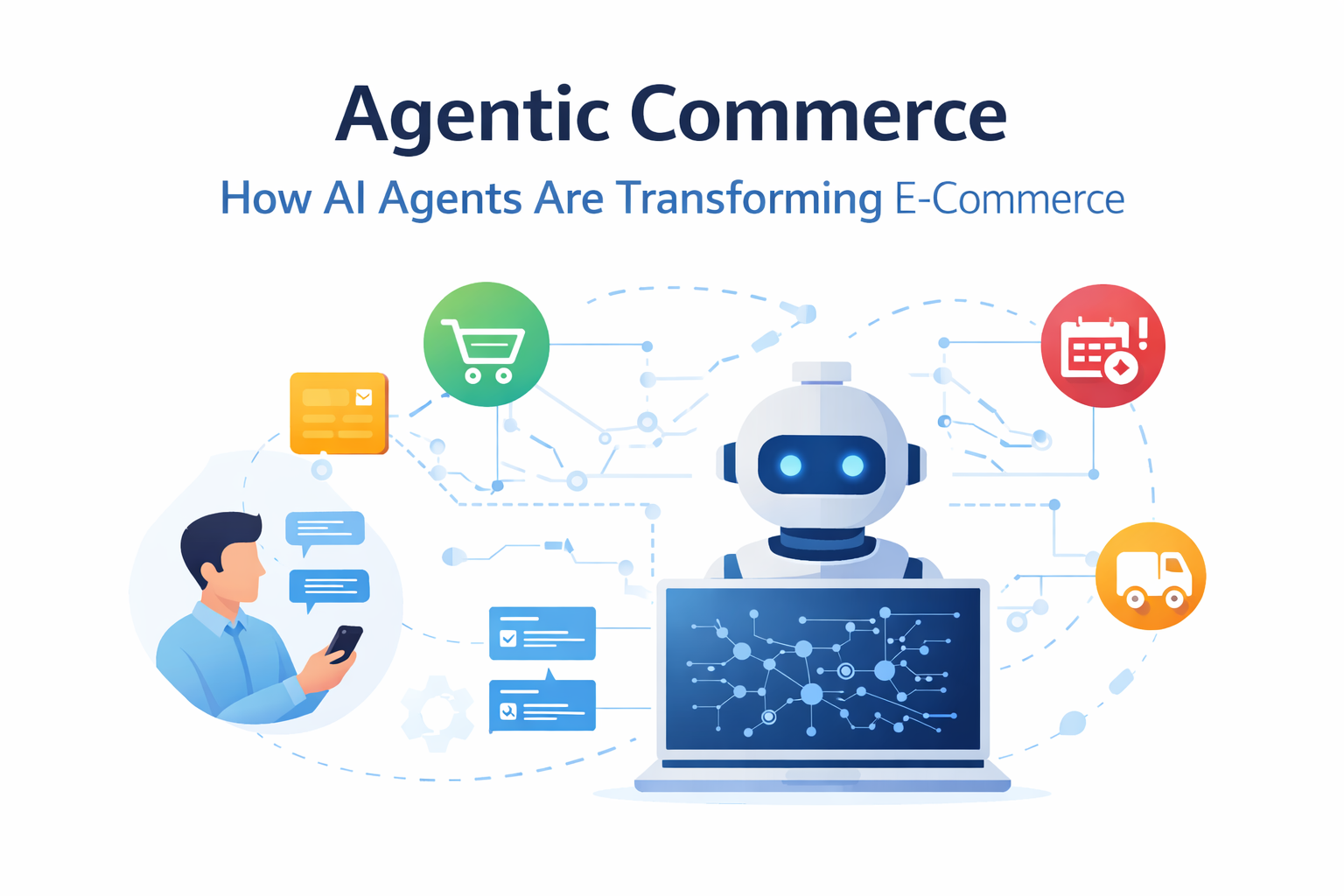
Agentic Commerce: 7 Powerful Ways AI Agents Are Transforming E-Commerce

Introduction

Agentic commerce is emerging as the next major shift in artificial intelligence and digital product development.
After the rise of generative AI, the industry is now moving toward agentic AI systems that can reason, plan, and act autonomously.

At Avinya Labs, we see agentic commerce as the evolution of e-commerce from static websites to intelligent systems that can complete tasks on behalf of the user.

Instead of searching, clicking, and filling forms, users interact with an AI agent that understands intent and executes actions automatically.

This guide explains what agentic commerce is, how it works, and how AI agents are changing the way modern digital products are built.


What is Agentic Commerce

Agentic commerce is a form of e-commerce where an AI agent can complete the entire transaction loop.

Traditional flow:

User → Search → Filter → Compare → Checkout

Agentic flow:

User → AI Agent → Plan → Execute → Purchase → Confirm

In agentic commerce, the user gives an instruction, and the system performs the steps automatically.

Example request:

Book me a nonstop flight to London under $600 next week with no red-eye.

An agentic system can:

  • search flights
  • check preferences
  • verify loyalty accounts
  • select the best option
  • complete the purchase

This is the difference between generative AI and agentic AI.


Why Agentic Commerce Matters

Modern e-commerce has friction:

  • too many options
  • manual comparisons
  • repetitive forms
  • slow checkout
  • no personalization

Agentic commerce removes friction by allowing AI agents to act on behalf of the user.

Benefits:

  • faster decisions
  • better personalization
  • fewer clicks
  • automation of routine purchases
  • context-aware recommendations

Agentic systems turn websites into services.


From Generative AI to Agentic AI

Generative AI can:

  • write text
  • create images
  • answer questions

Agentic AI can:

  • plan actions
  • use tools
  • call APIs
  • make decisions
  • complete tasks

This shift is important for ecommerce, fintech, travel, and SaaS.

Diagram description:

User → AI → Reasoning → Tools → API → Action → Result

Agentic commerce is built on this architecture.


Core Components of Agentic Commerce

Agentic systems rely on three main pillars.

Memory

Agents store context about the user.

Examples:

  • preferences
  • past purchases
  • size
  • budget
  • habits

Memory allows personalization.

Memory types:

  • short-term memory
  • long-term memory
  • vector memory
  • database memory

Memory is required for agentic commerce.


Tools and API Integration

Agents must access external systems.

Examples:

  • payment gateways
  • inventory APIs
  • booking APIs
  • shipping APIs
  • CRM systems

Without tools, agents cannot act.

Example flow:

Agent → API → Payment → Order → Confirmation

Modern agentic systems rely heavily on API orchestration.

External reference:

https://platform.openai.com/
https://stripe.com/
https://aws.amazon.com/


Reasoning

Reasoning allows agents to break tasks into steps.

Example:

Plan dinner party

Steps:

  1. find recipes
  2. check allergies
  3. order groceries
  4. schedule delivery

Reasoning makes agentic commerce possible.

Reasoning models use:

  • LLM planning
  • tool calling
  • chain of thought
  • multi-step execution

This is the core of agentic AI.


Architecture of Agentic Commerce Systems

Typical architecture:

User → UI
UI → Agent
Agent → Memory
Agent → Tools
Agent → APIs
Agent → LLM
LLM → Decision
Decision → Action
Action → Result

Diagram description:

User → Agent → Planner → Tool → API → Database → Response

Agentic commerce requires orchestration, not just chat.


Hyper-Personalization in Agentic Commerce

Traditional ecommerce uses segmentation.

Agentic commerce uses individual context.

Examples:

  • remembers favorite brands
  • knows budget
  • predicts needs
  • auto-reorders items

This creates:

  • faster checkout
  • higher conversion
  • better UX
  • less friction

Agents turn ecommerce into conversation.


Autonomous Purchasing

One of the biggest changes in agentic commerce is autonomous action.

Examples:

  • reorder groceries
  • renew subscriptions
  • book travel
  • schedule services

Users set permissions, and agents execute.

This requires strong permission systems.


Engineering Challenges in AI-driven commerce

Agentic systems introduce new risks.

Developers must solve:

  • security
  • permissions
  • liability
  • explainability
  • governance

This makes agentic commerce more complex than normal ecommerce.


The Liability Problem

If an agent makes a mistake:

Who is responsible?

Possible answers:

  • user
  • developer
  • retailer
  • payment provider

Systems must log every decision.

Audit logs are required.


Guardrails and Permissions

Agents must have limits.

Examples:

Allowed:

  • buy groceries
  • renew subscription

Not allowed:

  • large payments
  • unknown vendors

Permission systems must be granular.

Users must control the agent.


Transparency and Explainability

Users must understand why the agent acted.

Example:

Flight selected because:

  • cheaper
  • preferred airline
  • no red-eye
  • loyalty points

Explainability builds trust.

UI must show reasoning.


Security in Agentic Systems

Agentic commerce increases attack surface.

Risks:

  • prompt injection
  • malicious APIs
  • fake data
  • adversarial input

Security measures:

  • validation
  • sandboxing
  • permission checks
  • logging
  • monitoring

Security is critical for production agents.


Multi-Agent Systems in Commerce

Future systems will not use one agent.

They will use multiple agents.

Example:

Travel agent
Calendar agent
Finance agent
Booking agent

Flow:

Agent → Agent → Agent → Result

Multi-agent architecture improves accuracy.

Diagram description:

User → Main Agent → Sub Agents → APIs → Result

Multi-agent systems are the future of agentic commerce.


Why intelligent commerce Will Grow Fast

Reasons:

  • better LLMs
  • tool calling support
  • API ecosystems
  • payment integrations
  • vector memory
  • multi-agent frameworks

Agentic commerce is already appearing in:

  • travel
  • retail
  • fintech
  • SaaS
  • marketplaces

This shift is similar to the move from web to mobile.


Building Agentic Systems at Avinya Labs

At Avinya Labs, we build production-grade agentic systems including:

  • AI agents
  • workflow automation
  • API orchestration
  • multi-agent platforms
  • secure permission systems
  • custom AI backends

We focus on real business systems, not demos.

We help companies build the infrastructure for agentic commerce.

Serving clients globally including Dubai, Singapore, and Hong Kong.


FAQ

What is agentic commerce

Agentic commerce is a system where AI agents can complete purchases or actions automatically without manual steps.

How is agentic AI different from generative AI

Generative AI creates content, while agentic AI can plan, reason, and execute actions.

Is agentic commerce safe

Yes, if permission systems, logging, and security controls are implemented correctly.

Do agentic systems use APIs

Yes, agentic systems rely heavily on APIs to interact with external services.

What are multi-agent systems

Multi-agent systems use multiple specialized agents working together to complete complex tasks.

Can SMBs build agent-based ecommerce

Yes, SMBs can build agentic systems using LLMs, APIs, and workflow automation.

Is agentic commerce the future of ecommerce

Many experts believe agentic commerce will become the default way users interact with online services.

Why Minimum Lovable Product (MLP) Beats Minimum Viable Product (MVP)

A Founder’s Guide to Building Products Users Actually Want

For years, startups were told to build an MVP: the simplest version of a product that can exist and still work.
But the truth is—“viable” is not enough anymore.

Users don’t fall in love with “viable.”
They fall in love with something that feels good to use, solves a real problem, and gives them a moment of delight on day one.

That’s where the Minimum Lovable Product (MLP) comes in.

An MLP does one thing exceptionally well.
It creates emotional resonance.
It earns the user’s trust instantly.
It gives them a reason to return.

And in today’s competitive landscape, that’s what wins.


Why MVP Is No Longer the Gold Standard

The MVP era made sense when:

  • Users tolerated bugs.

  • Markets moved slowly.

  • Competition was low.

  • “Ship and see” was acceptable.

But in 2025 and beyond, users have thousands of alternatives.
If your product feels clunky or confusing on the first try, they won’t wait for improvements—they’ll uninstall and move on.

The question is no longer:
“What’s the minimum we can build?”
But rather:
“What’s the minimum we can build that people will love?”

That’s the MLP mindset.


A Real Customer Story: How MLP Saved a Founder Months of Waste

A founder approached us with a detailed 4-month MVP plan.
It had everything—multi-chain logic, a complex dashboard, advanced settings, token mechanics.
On paper, it looked impressive.

But when we asked him:
“What’s the one moment where your user says WOW?”
He couldn’t answer.

This is the most common red flag in product development:
A big roadmap with no emotional core.

So we rewrote the approach.

Here’s what we did:

  • Removed 60% of the planned features

  • Identified the single pain point users cared about

  • Designed a frictionless onboarding flow

  • Guaranteed value in under 90 seconds

  • Built a modular backend ready for future expansion

Two weeks later, the MLP launched.

What happened next shocked the founder:

  • Users didn’t ask about missing features

  • Retention was higher than expected

  • The product received unsolicited positive feedback

  • Early adopters recommended it to others

  • Investor conversations improved immediately

The founder told us:
“This feels like a real product, not a test version.”

Because that’s the power of MLP.
It makes your early version lovable not tolerable.


How We Build MLPs at Avinya Labs

We use three core principles:

1. Ruthless Scope

One job. Done brilliantly.**
MLPs don’t try to solve everything.
They solve one painful problem better than anyone else.

2. Zero-to-Value in Minutes

Onboarding that feels invisible.**
If users can’t get value in the first few minutes, they leave.
We design flows that deliver payoff instantly.

3. Built to Grow

Modular code, data ready for AI.**
An MLP isn’t the final product—it’s the foundation.
We build it with scalability in mind, so future versions ship faster.


MLP Is Not About Less Work—It’s About the Right Work

The biggest misconception is that MLP means building “small.”
It doesn’t.

MLP means building focused.
Intentional.
Emotion-driven.
User-first.

The market rewards products that create love early—not those that feel like half-baked prototypes.


Why Founders Should Adopt MLP Thinking Today

If you shift from MVP → MLP, you gain:

✅ Faster launches
✅ Higher retention
✅ Clearer user feedback
✅ Better investor conversations
✅ Lower development cost
✅ Stronger brand resonance

In short, MLPs give you momentum, not just functionality.


Final Thought

Don’t build to check a box.
Build to create a moment.

That moment when the user thinks:

“This is exactly what I needed.”

The products that win aren’t the most complete.
They’re the most loved – from day one.