RAG vs Fine Tuning for Business AI: 7 Powerful Differences Every SMB Should Know

Introduction

When building AI systems for companies, one of the most common questions is whether to use RAG vs fine tuning for business AI.

Both approaches allow businesses to customize LLMs, but they solve very different problems. Many SMBs try fine tuning when they actually need retrieval, while others build RAG systems when model training would work better.

Understanding the difference between RAG vs fine tuning for business AI is important when building internal AI tools, knowledge assistants, automation systems, and document search platforms.

RAG vs fine tuning for business AI is one of the most common decisions when building internal AI systems, knowledge assistants, or automation platforms for SMBs.

This guide explains architecture, differences, use cases, and best practices used in real production AI systems.


What is RAG in Business AI

RAG stands for Retrieval-Augmented Generation.

A RAG system retrieves company data at runtime and sends it to the LLM before generating a response.

Flow:

User → Query → Retriever → Vector DB → Context → LLM → Response

RAG is commonly used for:

  • company knowledge base
  • internal chatbot
  • document search
  • support AI
  • workflow automation

RAG works best when company data changes often.


What is Fine Tuning in Business AI

Fine tuning means training a model on custom data so the model learns behavior, style, or domain knowledge.

Instead of retrieving documents, the model itself is modified.

Fine tuning is used for:

  • classification
  • structured output
  • tone control
  • domain language
  • scoring models

Companies building internal AI systems often need:

  • access to company documents
  • knowledge search
  • automation logic
  • consistent output
  • custom behavior

This leads to the decision:

RAG vs fine tuning for business AI.

Choosing the wrong architecture can cause:

  • bad answers
  • high cost
  • slow performance
  • hard maintenance

Correct architecture is critical for long-term AI systems.


When to Use RAG

Use RAG when:

  • data changes often
  • documents are large
  • knowledge stored in files
  • multiple data sources exist
  • real-time search needed

Common SMB use cases:

  • internal GPT
  • company knowledge base
  • support assistant
  • SOP search
  • HR bot
  • document lookup
  • proposal generator

RAG is best for knowledge systems.


When to Use Fine Tuning

Use fine tuning when:

  • behavior must change
  • output must follow format
  • domain language needed
  • classification required
  • consistent answers needed

Examples:

  • email classifier
  • intent detection
  • scoring model
  • structured JSON output
  • custom chatbot style

Fine tuning is best for behavior.


RAG vs Fine Tuning Architecture Comparison

RAG architecture:

Documents → Embedding → Vector DB
Query → Retriever → Context → LLM

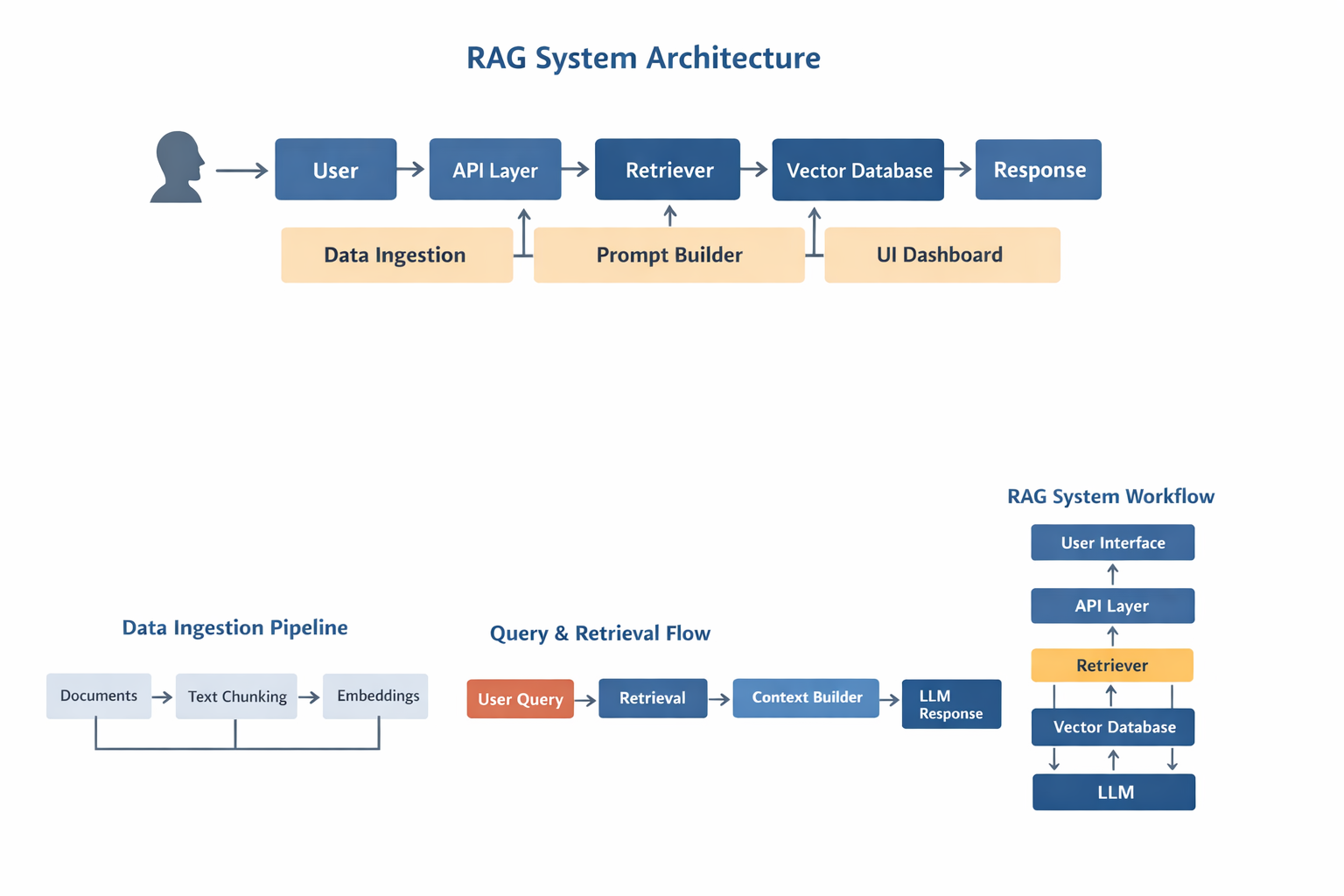
RAG Diagram

Fine tuning architecture:

Dataset → Training → Model update → Inference

Key difference:

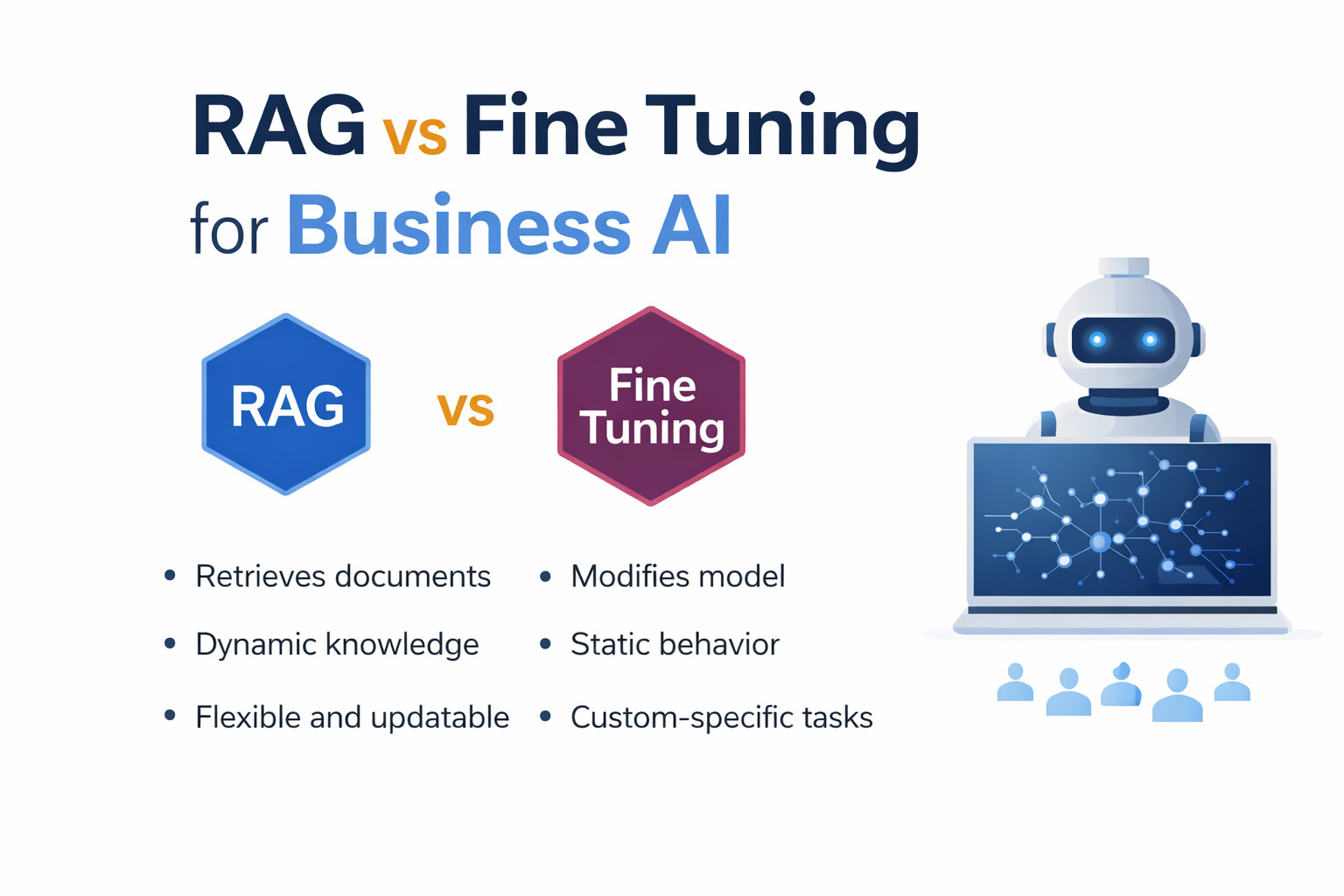
  • RAG retrieves data
  • Fine tuning changes model

Diagram description:

RAG
User → API → Retriever → Vector DB → LLM

Fine tuning
Dataset → Training → Model → API


Data Flow Comparison

RAG flow:

Query
→ Search
→ Context
→ LLM
→ Answer

Fine tuning flow:

Query
→ Model
→ Answer

RAG is dynamic.
Fine tuning is static.


Hybrid Architecture: Using RAG and Fine Tuning Together

Most real AI systems use both.

Hybrid flow:

User → Agent → Retriever → Vector DB → Context → LLM → Fine-tuned model → Response

Why hybrid works:

  • RAG provides knowledge
  • Fine tuning provides behavior
  • Agents provide automation

Example:

Support AI
RAG → docs
Fine tuning → format
Agent → actions

Hybrid systems are common in production.


Using RAG with AI Agents

Modern AI systems use:

Agents + RAG + Fine tuning

Agents → automation
RAG → knowledge
Fine tuning → behavior

Example:

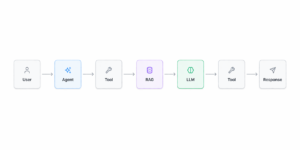
User → Agent → Tool → RAG → LLM → Tool → Response

Used in:

  • workflow automation
  • CRM AI
  • support AI
  • dashboards
  • SaaS tools

For SMB AI, this architecture is recommended.


Choosing the Right Vector Database

Popular vector DB:

  • Pinecone
  • Qdrant
  • Weaviate
  • Milvus
  • PGVector

Pinecone — managed
Qdrant — fast
Weaviate — hybrid search
PGVector — simple


Prompt Engineering in RAG vs Fine Tuning

RAG prompt:

Context + Question + Instructions

Fine tuning prompt:

Question → Model

Bad prompts cause hallucinations.

Best practice:

  • limit context
  • include metadata
  • give rules
  • avoid long prompts

Prompt design affects accuracy.


Performance Comparison

RAG depends on:

  • retriever
  • embeddings
  • vector DB
  • prompt

Fine tuning depends on:

  • dataset
  • training
  • model

RAG easier to update.
Fine tuning faster inference.


Latency Comparison

RAG latency:

retrieval + LLM

Fine tuning latency:

LLM only

Reduce RAG latency with:

  • caching
  • smaller chunks
  • fast DB

Maintenance Differences

RAG:

update docs
re-embed
re-index

Fine tuning:

retrain
test
deploy

RAG easier for changing data.


Deployment Strategies

Cloud RAG
Hybrid RAG
Local RAG
Fine tuning server

SMB → cloud
Enterprise → hybrid


Monitoring and Logging

Track:

  • queries
  • context
  • errors
  • latency
  • usage

Production AI needs monitoring.


Real Production Architecture

User → UI
UI → API
API → Agent
Agent → Retriever
Retriever → Vector DB
Vector DB → LLM
LLM → Tool
Tool → Response

Used in real systems.


Why Most SMB AI Systems Start with RAG

Most companies have documents, not datasets.

Typical order:

1 RAG
2 Agents
3 Fine tuning
4 Automation

RAG is usually first step.


Why Avinya Labs

Avinya Labs builds:

Serving globally including Dubai, Singapore, Hong Kong.


FAQ

What is the difference between RAG vs fine tuning for business AI

The main difference between RAG vs fine tuning for business AI is how the model gets information.

RAG (Retrieval-Augmented Generation) retrieves company documents at runtime and sends them to the LLM before generating an answer. This makes RAG ideal for knowledge bases, document search, and internal AI tools.

Fine tuning modifies the model itself by training it on custom data. This makes fine tuning better for behavior changes, classification, or structured output.

Most business AI systems use RAG for knowledge and fine tuning for behavior.


When should a company use RAG instead of fine tuning

A company should use RAG when:

  • documents change frequently
  • knowledge stored in files or databases
  • multiple data sources exist
  • real-time search is required
  • internal knowledge must stay private

RAG is commonly used for company knowledge base systems, internal chatbots, support assistants, and document search tools.

For most SMB AI systems, RAG is the correct starting architecture.


When is fine tuning better than RAG

Fine tuning is better when the model needs to learn behavior instead of retrieving knowledge.

Use fine tuning when:

  • output format must be consistent
  • classification is required
  • domain language is needed
  • responses must follow rules
  • the same patterns repeat often

Fine tuning works well for scoring models, intent detection, structured responses, and domain-specific AI.

Fine tuning does not replace RAG for knowledge systems.


Can RAG and fine tuning be used together

Yes, modern AI systems often combine both.

Typical architecture:

User → Agent → RAG → LLM → Fine tuned layer → Response

In this design:

  • RAG provides knowledge
  • Fine tuning controls output
  • Agents handle automation

This hybrid approach is common in production AI systems used by SMBs and enterprises.


Is RAG required for internal AI systems

In most cases, yes.

Internal AI systems usually need to access:

  • documents
  • SOPs
  • emails
  • databases
  • CRM data
  • support content

Since this data changes often, RAG is the best architecture.

Without RAG, the model cannot access updated information.


Do AI agents use RAG or fine tuning

Most AI agents use RAG.

Agents need access to company knowledge to complete tasks.
RAG allows agents to retrieve the correct information before calling tools.

Typical agent architecture:

Agent → Retriever → Vector DB → LLM → Tool → Result

Fine tuning may be added for behavior, but RAG is usually required for knowledge.


Is RAG more scalable than fine tuning

RAG is easier to scale when data changes often.

With RAG, you only need to update the vector database.
With fine tuning, you must retrain the model.

RAG scaling involves:

  • better retrievers
  • faster vector databases
  • caching
  • index optimization

Fine tuning scaling involves:

  • retraining
  • evaluation
  • redeployment

For most business systems, RAG is easier to maintain.


Can SMBs build RAG systems without training models

Yes.

One advantage of RAG is that it does not require model training.

You can build a RAG system using:

  • embeddings
  • vector database
  • LLM API
  • retriever logic

This makes RAG ideal for SMBs that want to use AI without managing training pipelines.


Is RAG secure for company data

Yes, if implemented correctly.

A secure RAG system should include:

  • authentication
  • document permissions
  • encrypted storage
  • API security
  • logging

The LLM should only receive the retrieved context, not the full database.

Security design is important for internal AI tools.


Should I use RAG, fine tuning, or both

Most production AI systems use all three:

  • RAG for knowledge
  • Fine tuning for behavior
  • Agents for automation

Recommended order for SMB AI:

  1. Start with RAG
  2. Add agents
  3. Add fine tuning if needed

This approach keeps the system flexible and scalable.


Does RAG improve AI accuracy for business use

Yes.

RAG improves accuracy because the model receives real company data before answering.

Without RAG, the model relies only on training data, which may be outdated.

RAG is the main reason modern business AI systems can work with private data.


Can RAG work with local LLMs

Yes.

RAG can work with:

  • OpenAI
  • Claude
  • local LLM
  • on-prem models

The architecture stays the same.

Only the LLM changes.

This makes RAG useful for companies with privacy requirements.


What is the best architecture for business AI today

The most common architecture today is:

Agent + RAG + LLM + Tools

This allows:

  • knowledge access
  • automation
  • structured output
  • workflow execution

This architecture is used in modern AI platforms, SaaS tools, and internal automation systems.


RAG System for Company Knowledge Base: 7 Powerful Architecture Tips for SMB AI Systems

Introduction

A RAG system for company knowledge base allows businesses to use AI with internal documents, SOPs, emails, and databases without training a custom model.
Instead of storing knowledge inside the model, a RAG architecture retrieves relevant information at runtime and sends it to the LLM.

This approach is becoming the standard for SMBs building internal AI tools, knowledge assistants, and workflow automation systems.

A RAG system for company knowledge base helps SMBs build internal AI using their own documents, databases, and workflows.

In this guide, we explain the architecture, components, implementation, and best practices for building a RAG system for business knowledge.


What is a RAG System for Company Knowledge Base

RAG stands for Retrieval-Augmented Generation.

A RAG system for company knowledge base works by:

  1. Storing company data in a searchable format
  2. Retrieving relevant content when a question is asked
  3. Sending the retrieved context to an LLM
  4. Generating an accurate answer

Basic flow:

User → Query → Retriever → Vector DB → Context → LLM → Response

This allows companies to build internal AI without training models.


Why a RAG Knowledge System Matters for SMBs

Most SMBs store knowledge across:

  • Google Drive
  • Notion
  • Slack
  • Emails
  • PDFs
  • CRM
  • Project tools

Problems:

  • information hard to find
  • repeated questions
  • slow onboarding
  • manual search
  • support dependency

A RAG system solves this by creating a single AI interface for company knowledge.

Common SMB use cases:

  • internal chatbot
  • SOP search
  • sales knowledge assistant
  • support documentation AI
  • HR policy search
  • proposal generator
  • document lookup

When to Use and When Not to Use RAG

Use RAG when:

  • data changes often
  • documents are large
  • knowledge is external
  • you need search + AI

Do NOT use RAG when:

  • you need model training
  • data is very small
  • behavior learning required
  • no document base exists

Alternatives:

  • fine tuning
  • rule engines
  • agents
  • search systems

RAG System Architecture Overview

A production RAG system for company knowledge base contains multiple layers.

Architecture diagram:

User
→ API Layer
→ Query Processor
→ Retriever
→ Vector Database
→ Context Builder
→ LLM
→ Response Formatter
→ UI Dashboard

Core modules:

  • ingestion pipeline
  • embedding model
  • vector database
  • retriever
  • prompt builder
  • LLM
  • backend API
  • frontend UI

A production RAG system for company knowledge base requires a proper retrieval pipeline, vector database, and LLM integration.

Correct architecture is critical for accuracy.


Architecture Diagram Description

Diagram:

Documents → Chunking → Embeddings → Vector DB
User → API → Retriever → Vector DB → Context → LLM → Response
Admin → Upload → Index → Search

RAG system diagram

This diagram represents a typical RAG system used in production.


Components of a RAG System

Document Loader

Loads data from:

  • PDF
  • DOC
  • DB
  • API
  • Notion
  • Drive
  • Slack

Converts to text.


Text Chunking

Documents split into smaller parts.

Rules:

  • 500–1000 tokens
  • overlap enabled
  • semantic boundaries

Bad chunking reduces accuracy.


Embeddings

Text → vector representation.

Common models:

  • OpenAI embeddings
  • BGE
  • E5
  • Instructor

Embeddings enable semantic search.


Vector Database

Stores embeddings.

Popular options:

  • Pinecone
  • Qdrant
  • Weaviate
  • Milvus
  • PGVector

Vector DB allows similarity search.


Retriever

Finds relevant chunks.

Methods:

  • similarity search
  • hybrid search
  • reranking

Retriever quality affects output quality.


Prompt Builder

Combines:

  • user query
  • context
  • instructions

Prompt = Context + Question + Rules

Prompt design is important.


LLM Layer

Model options:

  • GPT
  • Claude
  • open-source LLM
  • local LLM

LLM generates final answer.


API Layer

Handles:

  • auth
  • requests
  • logging
  • caching
  • rate limits

Common backend:

  • Node
  • Python
  • FastAPI

UI Dashboard

Provides:

  • chat interface
  • search UI
  • admin panel
  • document upload
  • analytics

Frontend stack:

  • React
  • Next.js
  • Tailwind

Data Flow in a RAG System

Flow:

Documents
→ Loader
→ Chunking
→ Embedding
→ Vector DB

Query
→ Retriever
→ Context
→ LLM
→ Answer

Clear flow improves performance.


Step-by-Step Implementation

  1. Define data sources
  2. Build ingestion pipeline
  3. Create embeddings
  4. Store in vector DB
  5. Implement retriever
  6. Connect LLM
  7. Build API
  8. Build UI
  9. Add auth
  10. Add logging

Production systems require all layers.


Tech Stack Options

Typical stack:

Alternative stack:

  • local LLM
  • Milvus
  • FastAPI
  • Redis

Stack depends on scale.


SMB vs Enterprise RAG Design

SMB:

  • single index
  • simple retriever
  • small docs
  • basic UI

Enterprise:

  • multi index
  • permissions
  • caching
  • reranking
  • orchestration
  • audit logs

Design must match usage.


Real Use Cases

  • internal GPT
  • AI support agent
  • AI sales assistant
  • document AI
  • HR bot
  • ops automation
  • knowledge search

Most business AI starts with RAG.


RAG vs Fine Tuning vs Agents

RAG

  • best for knowledge

Fine tuning

  • best for behavior

Agents

  • best for automation

Many systems combine all.


Best Practices

  • clean data
  • good chunking
  • metadata tagging
  • hybrid search
  • caching
  • monitoring
  • access control

Best practices improve accuracy.


Common Mistakes

  • bad chunk size
  • wrong embeddings
  • too much context
  • weak retriever
  • no security
  • no logging

Most failures come from architecture.


Scaling RAG Systems

Scaling requires:

  • caching
  • async retrieval
  • multi index
  • rerank models
  • batching
  • sharding

Large systems need optimization.


Security Considerations

Important for SMB:

  • auth
  • permissions
  • encryption
  • logging
  • access control

Never expose internal data.


Future of RAG Systems

Trends:

  • multi-agent RAG
  • memory systems
  • hybrid search
  • local + cloud LLM
  • tool calling

RAG will remain core architecture.


Why Avinya Labs

Avinya Labs builds production AI systems including:

Serving clients globally including Dubai, Singapore, and Hong Kong.


FAQ

What is a RAG system for company knowledge base

A RAG system for company knowledge base allows an AI model to retrieve internal documents, SOPs, and business data before generating answers.

Why use RAG instead of fine tuning

RAG works better for company knowledge because documents change frequently and do not require model retraining.

Can SMBs build a RAG system

Yes, SMBs commonly use RAG systems to create internal chatbots, knowledge search tools, and automation assistants.

What database is used in RAG

Vector databases like Pinecone, Qdrant, Weaviate, or PGVector are commonly used in a RAG system for company knowledge base.

Is RAG secure for internal data

Yes, when authentication, permissions, and API security are implemented, RAG systems can safely use private company data.

Can RAG be used with AI agents

Yes, many modern AI agent systems use RAG to access company knowledge during automation workflows.

How does a RAG system scale

Scaling requires caching, multiple indexes, better retrievers, and optimized embeddings.

Do all AI systems need RAG

No, but most business AI applications that use documents or knowledge bases benefit from RAG architecture.


A well-designed RAG system for company knowledge base can become the core of internal AI automation.